Login and permissions
If the command runs but the task dies immediately, check login and whether the account still has Codex. Web works and CLI fails is usually local auth, not the model.
Corp networks block OAuth or sockets. Try another network. A too-strict permission mode also looks like a broken agent.
A permission mode that forbids writes looks like a broken agent. Try a read-only question before you reinstall.
- Sign in once more.
- Compare with the web UI.
- Retry a read-only task.
Command not found or instant exit
Use which, or where on Windows, and inspect PATH. A user-local binary is often invisible to GUI terminals.
If version works and the task crashes, read logs under the Codex home before you uninstall the extension.
GUI terminals often miss a user-local PATH. Open the same OS terminal the installer mentioned.
- Open a new terminal.
- Confirm the executable path.
MCP shows connected but the tool fails
Split not-connected from connected-but-error. Not connected means command, args, cwd, or PATH.
If connected, read server logs. A stdio process waiting on a prompt looks like a client timeout. Run the same command in a terminal.
A server that prints a banner and waits is not connected. The client will sit on a timeout.
- Start the server by hand.
- Narrow to a read-only tool.
- Check allow lists and expired logins.
A skill is missing or ignored
Confirm the folder contains SKILL.md in a scanned location. Reload after edits.
If it appears but is ignored, the description is not a trigger, or the brief fights the skill. Invoke by name first.
Two skills with the same name usually cannot be selected together. Rename one.
- Check path and filename.
- Invoke by name again.
It edited the wrong files
Revert first. Put path bans at the top of AGENTS.md. Do not rely on the next prompt to undo a habit.
Split the task when the repo is large. Agents grab files that merely look related.
After a wild edit, revert, write the path ban at the top of AGENTS.md, and give only one directory next turn.
- Revert.
- Write bans.
- Give only one directory on the next turn.
Where to look before you reinstall
Logs usually live under the Codex home. An environment variable can move them. Check current docs instead of guessing a path from a blog.
Copy a redacted snippet, not the whole home folder, if you ask for help.
- Look under the Codex home first.
- Redact tokens before you share a snippet.
Windows and WSL mixed together
Run the agent on the same side the repo lives. Crossing the boundary looks like a missing file.
The official extension often has a WSL toggle. The CLI you installed on Windows will not magically see a Linux path.
- Same side as the repo.
- Check the extension WSL toggle.
Repair mistakes
Reinstalling the editor first hides PATH, login, and MCP process bugs.
Retrying a hung write is how you double-apply a patch.
- Reinstalling the editor first.
- Retrying a hung write.
Repair checklist
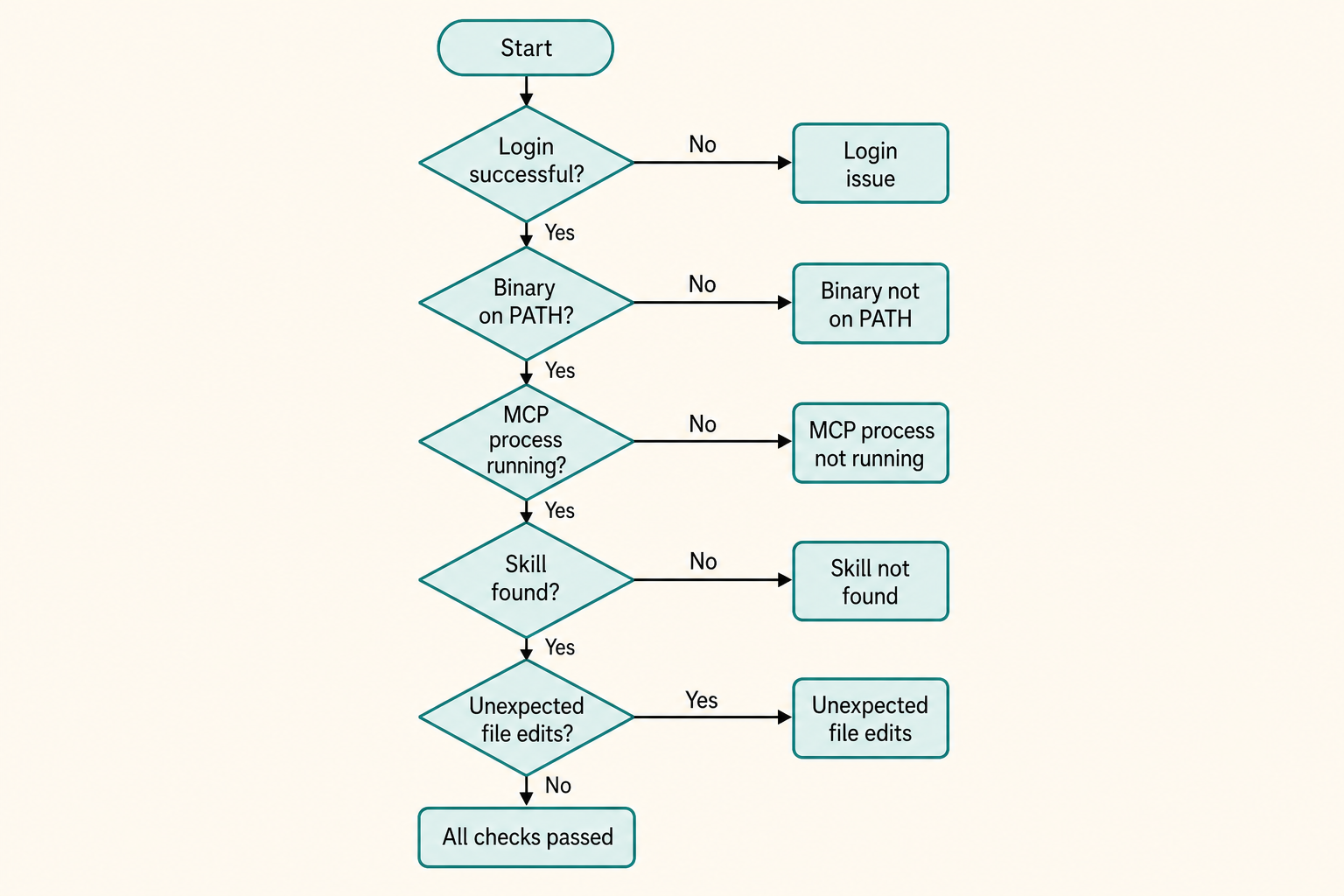
Work top down: login, binary, one read-only call, then MCP, then skills, then scope.
- Login works on a read-only question.
- Binary is on PATH in a fresh terminal.
- MCP process runs by hand.
- Wild edits reverted and banned.
When it works again
Return to the first-task loop. Do not celebrate by adding five servers.
If the same wild edit returns, the brief is still too late in the file. Move the ban up.