Login and keys
If the browser never opens, you may be forcing interactive mode on a headless host. Use the official key environment variable instead.
A bad key, an unprovisioned account, or a region gate all look like “the model is broken”. Check the official account page first.
Do not copy a teammate's session directory and call it your login.
- Separate browser auth from a key.
- Confirm the account can see the product.
- Do not reinstall to fix login.
Command not found or the wrong binary
New terminal, check PATH, confirm you installed the official build.
If several versions exist, use which or Windows where to see the real path.
WSL and Windows each have their own copy. Do not mix them.
- Open a new terminal.
- Verify the executable path.
- Do not overlay a random mirror.
Run inspect before you guess
Missing config, missing skills, and missing MCP are cheaper to see in inspect than to reinstall.
Check that the current directory is the repo root. Launching in the home directory empties the discovery list.
Match source paths: user-level versus project-level, and whether one file overrides another.
- Run at the repo root.
- Check config, instructions, skills, plugins, hooks, and MCP.
- Fix only the missing class.
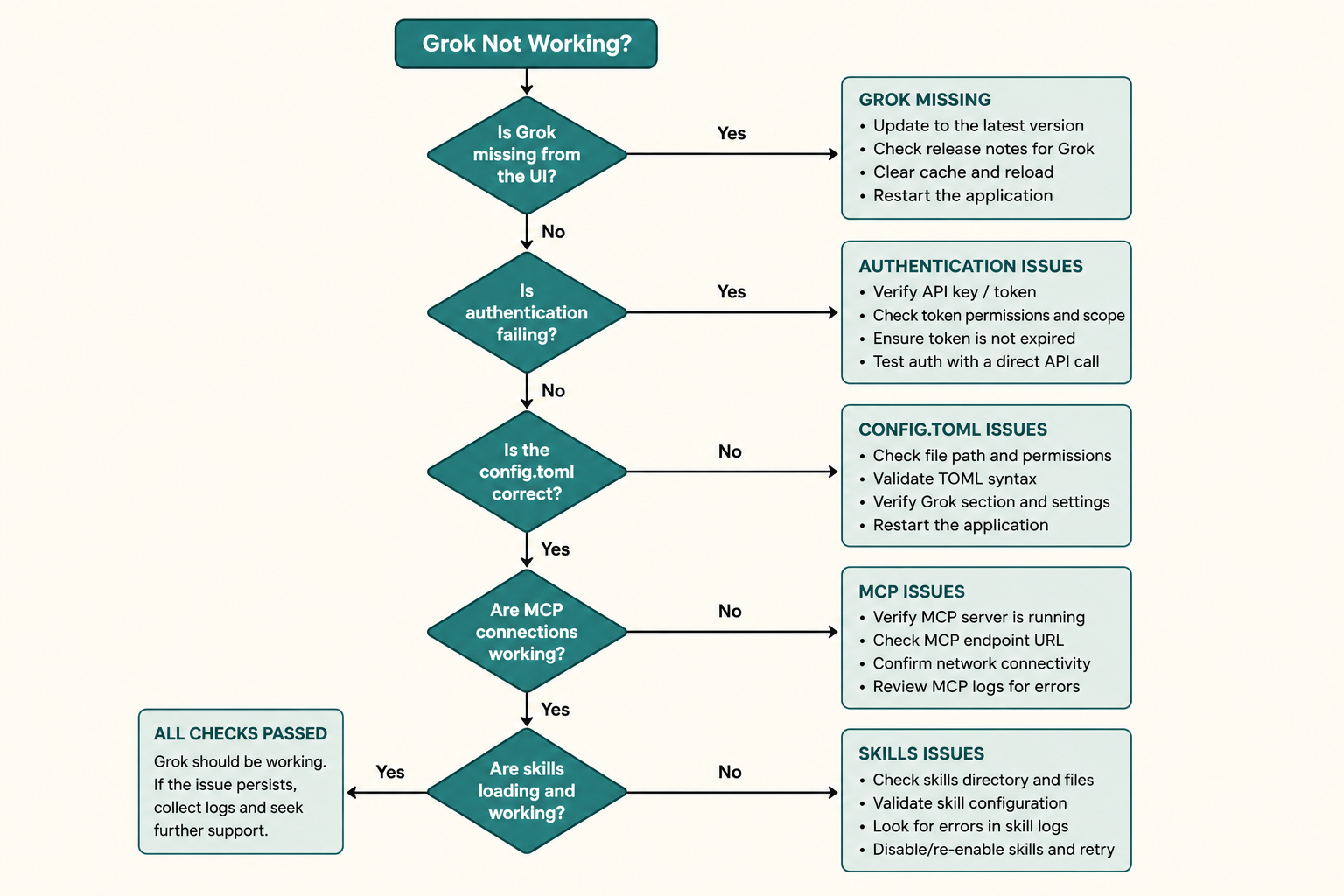
MCP process and permissions
Server missing: command path, working directory, environment.
Server present but tools fail: timeouts, huge results, permission mode denials.
Leave one server on so you know who is noisy.
- Does inspect list it?
- Can the local process start alone?
- Disable down to one.
Skill not found
Name, directory, and whether inspect lists it. Collisions need the qualified name.
A /skillify draft that still lives in a temp path will not enter the team repo.
- Is it in inspect?
- Name it instead of hoping.
- Check the qualified name.
Plan mode will not edit files
That is often a feature. The plan latch blocks edits until you approve.
If you already approved and still cannot write, check permission mode, hook denials, and a read-only worktree.
- Confirm you are not sitting in an unapproved plan.
- See whether a hook denied the write.
- Check disk permissions.
Too many edits or too few
Too many: revert, narrow paths, rewrite the plan.
Too few: the verify command may be wrong, or instructions banned that directory.
Do not append “try again” on a dirty tree.
- Read git diff first.
- Revert, then open a new turn.
- Re-read instruction bans.
Ways to make debugging worse
Reinstall, switch models, and add three MCP servers in the same breath.
Pasting a full inspect dump into a public forum.
- Overlaying an unofficial binary.
- Testing always-approve on a production repo.
- Writing a key into an issue.
Shortest path when you are stuck
Login or key, PATH, repo root, inspect, then one class of problem.
- grok runs.
- You are in the right directory.
- inspect prints.
- You fix one class at a time.
- You finish with a read-only check.
Return to the main path
Go back to the chapter where you stalled. The hub remains the table of contents.
When product behavior changes, official docs and the open-source issue tracker win.