command not found and the wrong binary
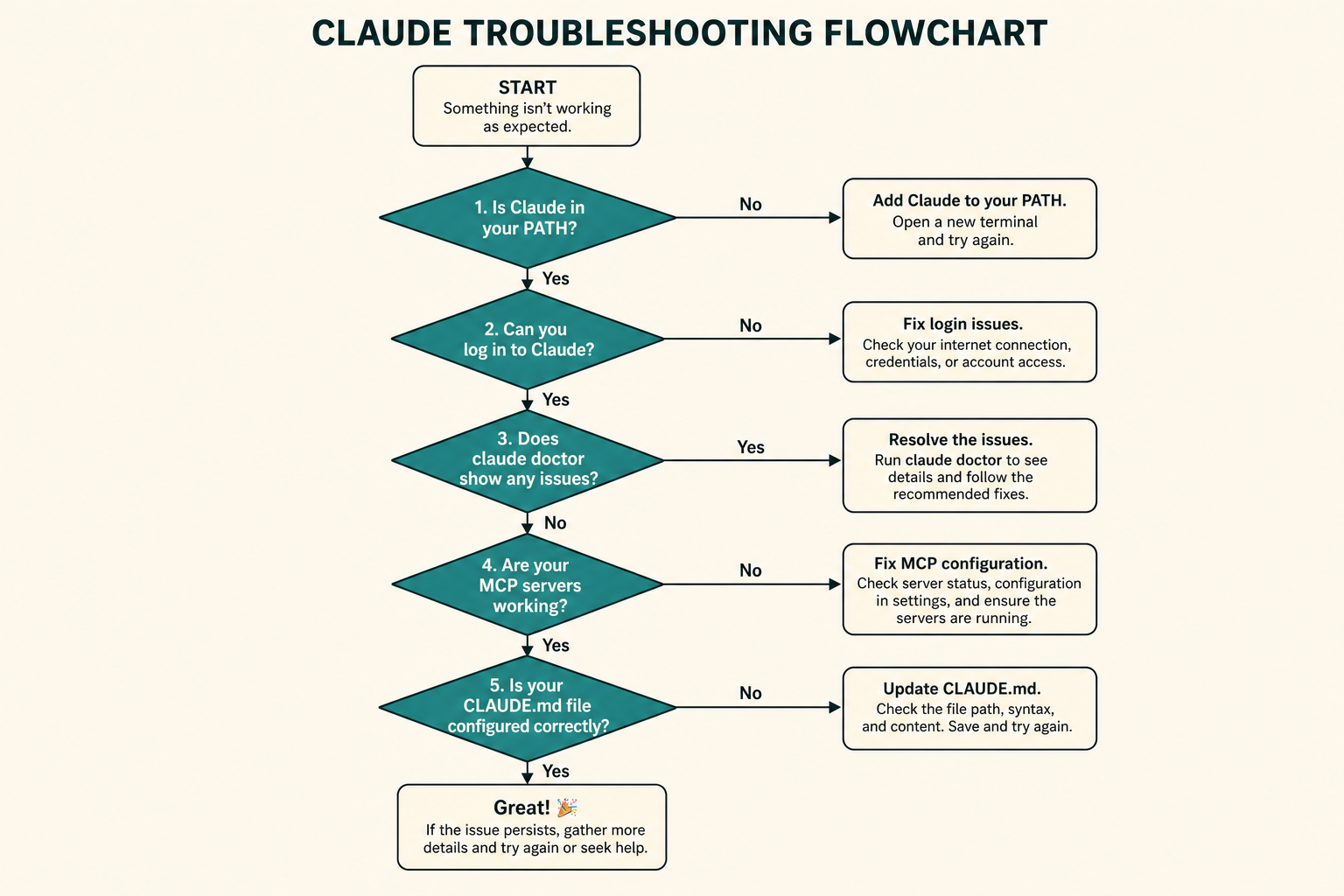
If claude is missing after a happy installer, you are usually in an old terminal or ~/.local/bin is not on PATH.
which claude and claude --version must match the install you just did. A leftover Node global is a frequent impostor.
Windows native and WSL do not share a home. Search both only if you installed both.
- New terminal.
- Print PATH and which claude.
- Remove or rename the stale copy.
Read claude doctor like a ticket
doctor prints install health, settings errors, and suggested fixes without starting a coding session. Run it in the project directory you care about.
Treat warnings as a checklist. Do not paste the full output into a public chat; it can include paths and server names.
If doctor is clean and the model is still dull, you have a prompt or repo problem, not an installer problem.
- Run in the repo root.
- Fix the first error, re-run.
- Keep the log private.
Browser loops and account gates
Login opens a browser. If the browser never returns, try another browser, disable a blocker, or use a text-mode instruction from today's docs.
Success in chat and denial in Code can both be true. That is an account gate. We do not invent a plan name as a fix.
API keys in the environment skip the browser only after you approve them. A bad key looks like a flaky install.
- Correct account.
- No key in the repo.
- Retry on a clean network before reinstalling.
Two installs at once
Native plus Homebrew plus a global package is a classic mess. doctor often shows a launcher you did not expect.
Uninstall with the same method you used to install. Then which claude should be empty before you install again.
- List every claude on PATH.
- Uninstall extras.
- One method, one binary.
MCP not visible
Confirm the config file the current surface actually reads. Restart. Check the env var in that same shell.
A hanging server is not fixed by a longer prompt. Kill it and shrink the query.
- Syntax.
- Env.
- Process starts.
- Read-only proof.
Skill not triggering
Wrong directory, skill not in the project the session opened, or a vague description.
Invoke by name on a tiny task after a new session.
- Path exists.
- New session.
- Description is specific.
Bad edits and runaway sessions
Revert first. Then shrink the file list. Do not ask it to 'fix everything you just broke' in the same dirty tree.
If it loops on the same tool, interrupt. Check whether a hook or MCP is feeding it garbage.
- Revert.
- Smaller ask.
- Interrupt loops.
Repair-stage mistakes
Reinstalling three times without which claude.
Pasting doctor output and an API key into a public issue.
- Ignoring PATH.
- Mixing WSL and native.
- Prompt-rewrites of an install bug.
Done looks like this
doctor is clean enough to work, which claude is unique, and you can start a session.
- One binary.
- doctor read.
- Login works or is a known account gate.
- MCP/skills checked only after launch.
- No secrets in tickets.
Back to the series or the index
If you came here from install, return to the first task. If you finished the series, keep the repair kit bookmarked.
Official install troubleshooting pages win when this course and your machine disagree.