Why stock tmux feels hostile on a phone
tmux is still the cheapest way to keep a remote editor, a test watcher, and a log tail alive when the SSH client drops. On a laptop that is almost free: you have a prefix key, a scroll wheel, and a physical Escape. On a phone those three inputs are missing or delayed. You tap the terminal and the pane does not focus. You swipe and the whole session jumps instead of the inner buffer. You hit Esc in Neovim and wait half a second before Normal mode arrives. None of that means tmux is the wrong tool. It means the default server options assume a desktop.
Termius is a full SSH client with snippets, keys, and a customizable accessory row above the software keyboard. That row is the difference between “I can type letters” and “I can drive a multiplexer.” The host still runs tmux. Termius only needs to send the prefix, arrows, and a startup command that reattaches the same named session after every reconnect. Mixing those two layers is the usual failure: people paste a create-or-attach command into ~/.tmux.conf, or they customize the keyboard and leave mouse mode off.
The rest of this guide is one pass through a host you already can log into. You will edit ~/.tmux.conf once, put a single startup snippet on the Termius host card, and pin three groups of keys. After that, a commute session should reopen the same panes instead of dumping you into a bare shell.
- The server holds the session; the phone is only a client.
- Touch, Escape, and the prefix are the three things a phone gets wrong first.
- Termius snippets and the keyboard add-on are client-side; tmux.conf is not.
What this page is, and what it is not
The five numbered tips below start from the TermiusHQ thread posted on 26 August 2026: https://x.com/TermiusHQ/status/2092720130723872858. We quote each tip in the wording of that thread, then add original how-to prose: where to type the line, what not to put in tmux.conf, how to reload, and how the Termius UI maps onto the advice. This is a rewritten guide, not a verbatim reprint of the thread or of Termius marketing pages.
TermiusHQ’s opening line is the right frame: tmux is great for remote development, but the default setup can feel awkward on a phone or tablet. The thread then ships five compact fixes. Those five lines are enough if you already live in tmux. They are not enough if you are editing the file from nano on a phone for the first time, or if you have never opened Customize Keyboard. The extra paragraphs on this page exist for that second reader.
Commands here are the public tmux flags from the thread. Session names, host labels, and key-group order are examples. Swap "my_project" for the name you will still recognize next week. If a Termius menu has moved, trust the in-app label over a screenshot date.
1/5 Enable touch: set -g mouse on
Quote from the thread: enable touch by adding `set -g mouse on` to ~/.tmux.conf — after that you can scroll, tap panes, and drag to resize. Faithfully, that is the whole first tip. The reason it matters on a phone is that without mouse mode, a swipe is eaten by Termius as terminal scrollback, or by the system as a gesture, and a tap does not change the active pane. With mouse mode on, tmux itself understands the touch stream as mouse events.
Open the file on the remote host, not on the phone’s local disk. From a Termius shell: nano ~/.tmux.conf or vim ~/.tmux.conf. Put `set -g mouse on` on its own line near the top. Save. Existing sessions do not reread the file until you run `tmux source-file ~/.tmux.conf` inside a live session, or you kill the server and start again. A brand-new `tmux new` after the file exists is enough for a first test.
Then prove it with three gestures before you add more options. Scroll inside a pane that has more output than the screen; the pane should move, not the whole Termius buffer. Tap a second pane; the border should mark it active. Drag a split; the divider should follow your finger. If none of that happens, you edited a different user’s home directory, or the session is still running the old config.
- Add exactly: set -g mouse on
- Edit ~/.tmux.conf on the SSH host, not a local iCloud file.
- Reload or open a new session, then scroll, tap, and drag once each.
2/5 Auto-restore the session with a Startup Snippet
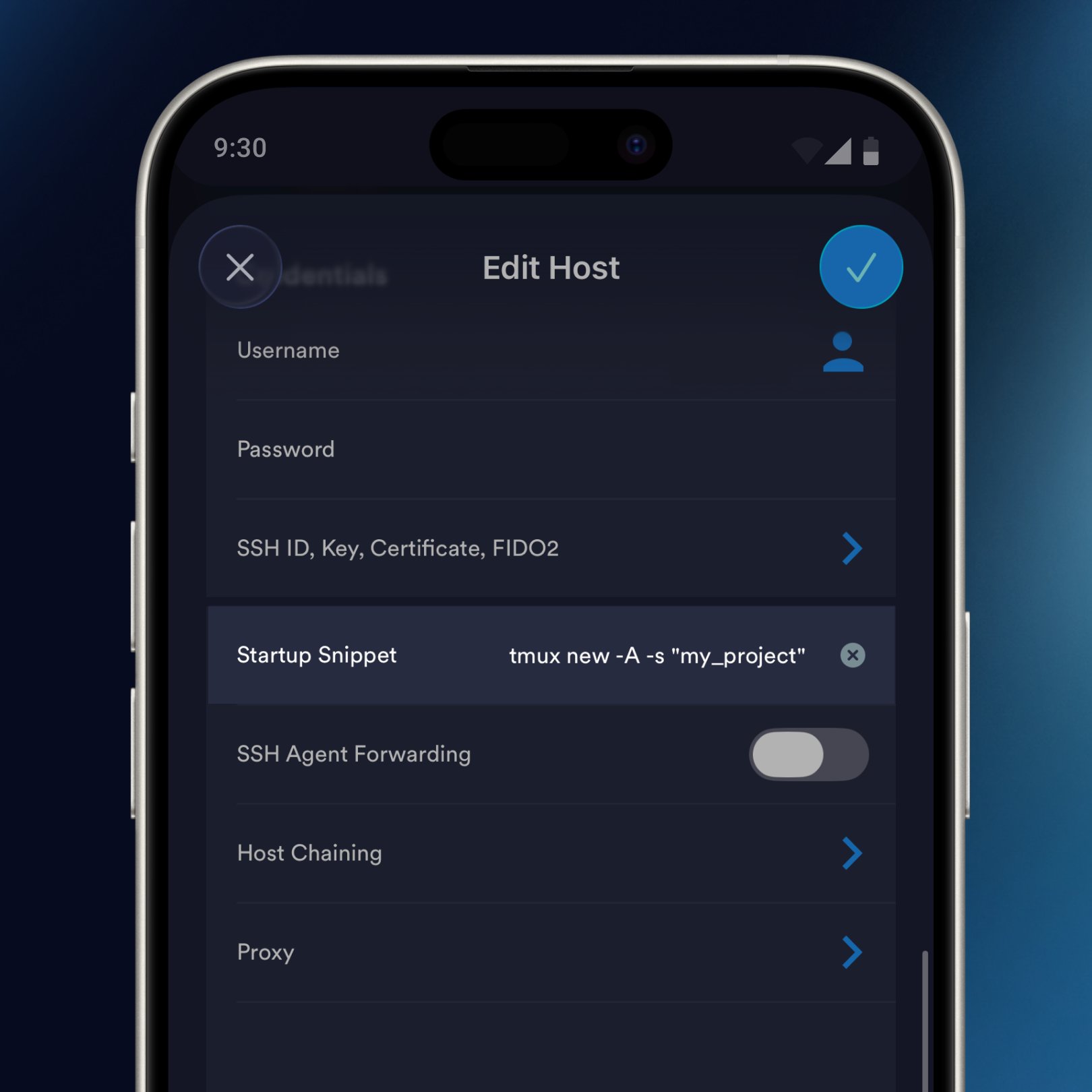
Quote from the thread: auto-restore the session by putting `tmux new -A -s "my_project"` in the Termius host Startup Snippet — not in tmux.conf. -A attaches if the session exists, otherwise it creates it. That distinction is the whole tip. tmux.conf is read by the server when a session starts. A create-or-attach command is a client invocation. If you drop `tmux new -A` into the conf file, the next nested start can recurse or you get a confusing “sessions should be nested with care” warning.
In Termius, open the host card → Edit Host → Startup Snippet. Paste `tmux new -A -s "my_project"` with your own session name. Save. The next connect runs that line after login, so you land inside tmux instead of a bare prompt. Use one name per real project. Two hosts that both attach "dev" will steal the same panes when they point at the same machine.
If the host already fires another snippet (ssh-agent, direnv, a banner), put the tmux line last so those hooks finish first. If you sometimes need a bare shell, keep a second Termius host card for the same hostname with an empty snippet. Do not toggle the snippet on and off every commute; you will forget which state you left it in.
- Termius path: Edit Host → Startup Snippet.
- Command: tmux new -A -s "my_project"
- Do not put this line in ~/.tmux.conf.
- -A means attach if present, else create.
3/5 Fix laggy Escape in Vim and Neovim
Quote from the thread: fix laggy Escape with `set -sg escape-time 10` and `set -g focus-events on`. The default 500ms makes Vim and Neovim sluggish. That 500ms is not a bug. tmux waits to see whether Esc is a lone key or the start of an Alt/meta sequence. On a hardware terminal that wait is tolerable. On a phone, every mode switch in Vim pays the tax, and the software keyboard already added its own delay.
Ten milliseconds is the value from the thread and is the one we recommend you try first. Some desktop configs use 0. Zero can break true meta chords if you still use Alt bindings inside tmux. On a phone you almost never send those chords, so 10 is the safer of the two aggressive settings. `focus-events on` tells tmux to forward focus in and out of panes, which Neovim plugins (git signs, cursorline, clipboard hooks) use to refresh when you jump between Termius and another app.
Add both lines to the same ~/.tmux.conf, reload, then open nvim and tap Esc from Insert mode. The statusline should flip to Normal without a visible pause. If it does not, you sourced the wrong file, or a later line in the conf resets escape-time. Search the file for escape-time and keep one assignment.
- set -sg escape-time 10
- set -g focus-events on
- Default wait is 500ms; that is why Vim feels sticky.
- Prefer 10 over 0 unless you are sure you need zero.
4/5 Copy mode with the prefix, then [
Quote from the thread: enter copy mode with Ctrl+B then `[`. Add `setw -g mode-keys vi`. Then use Vim keys, `/` to search, Space to select, Enter to copy. On a phone this is the only reliable way to grab a stack trace or a commit hash. OS text selection fights tmux pane borders and wraps the wrong lines. Copy mode selects inside the pane’s history.
Ctrl+B is the default prefix. If you rebound prefix to Ctrl+A, send that instead. After `[` you are in a frozen viewport. With `setw -g mode-keys vi` the motion keys are h j k l, w, b, 0, $. `/` opens a search; n repeats. Space starts the selection; move to the end; Enter copies into tmux’s paste buffer. Paste later with prefix then `]`. Termius still has its own paste button; that button pastes the phone clipboard, which is a different buffer.
The missing piece on mobile is sending the prefix and `[` without a hardware Ctrl. That is why tip 5 puts `^B` on Group 1 of the Termius keyboard. Practice the sequence once on a dummy file: ^B, `[`, `/`, type a word, Space, move, Enter, then ^B, `]`. If Enter does nothing, you are not in copy mode, or mode-keys is still emacs and you needed a different start-selection key.
- Prefix (Ctrl+B) then [ enters copy mode.
- setw -g mode-keys vi
- Vim motions, / search, Space select, Enter copy.
- Prefix then ] pastes the tmux buffer, not the phone clipboard.
5/5 Customize the Termius keyboard add-on
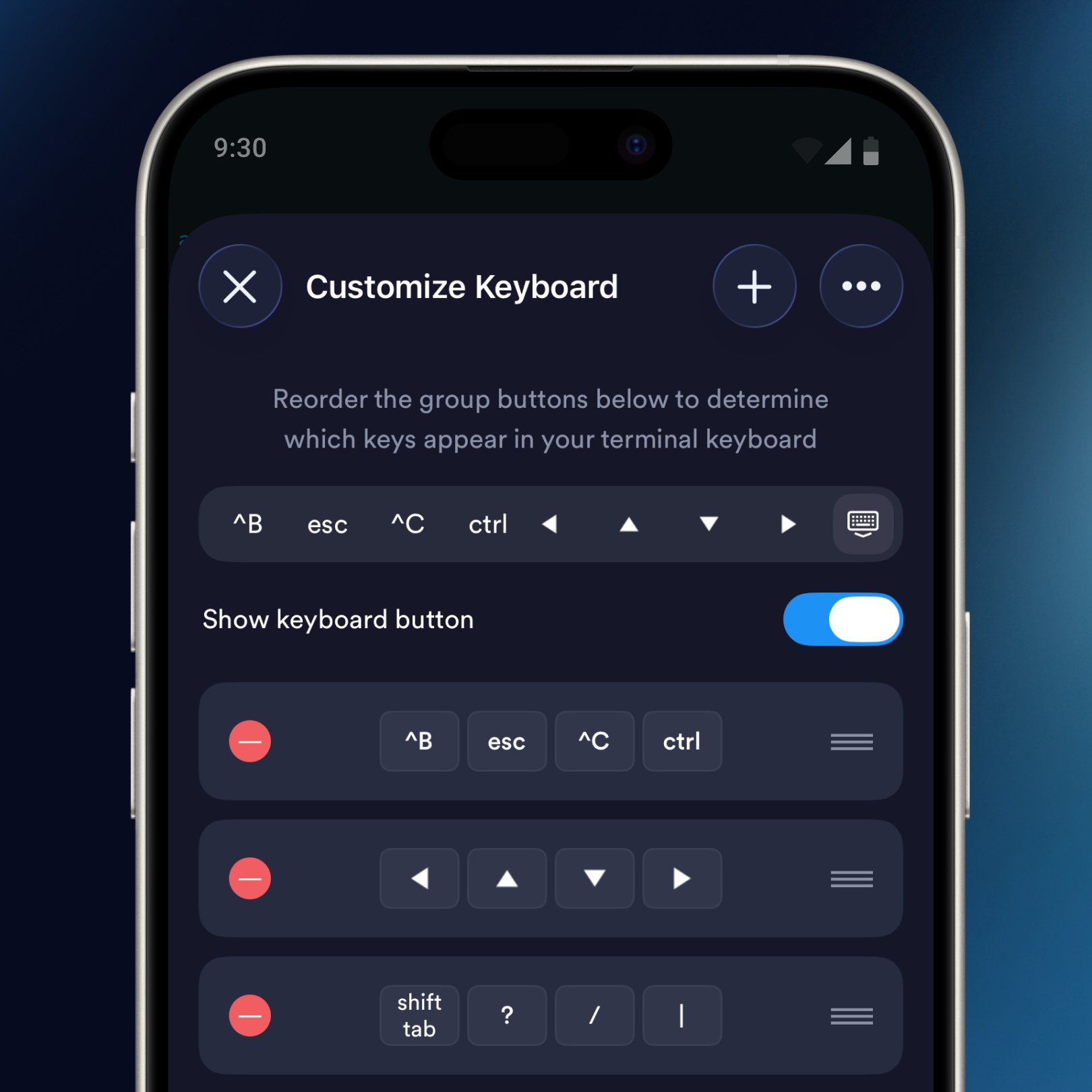
Quote from the thread: customize the Termius keyboard add-on. Group 1: ^B (or your prefix), Esc, ^C, Ctrl. Group 2: arrows. The screenshot that ships with the thread also has Group 3: shift tab, ?, /, |. Those twelve keys are not decoration. They are the keys a phone keyboard omits or buries under a symbols page, and they are exactly the keys tmux, Vim, and a shell want all the time.
In Termius, open Customize Keyboard from the terminal session or the app settings (the label is “Customize Keyboard”). Reorder the group buttons so Group 1 is the first row you see. Put ^B first if you still use the default prefix; if you remapped prefix, put that chord first instead. Esc belongs next to it so Vim mode changes do not require hunting. ^C interrupts a runaway command. The standalone Ctrl modifier lets you chord Ctrl+D, Ctrl+L, or Ctrl+Z without adding a dedicated key for every combination.
Group 2’s arrows move inside copy mode and inside tmux menus. Group 3 is for tmux’s own help and for command-line editing: `?` is the tmux key list after the prefix, `/` is both Vim search and tmux search, `|` splits a pane vertically in many people’s muscle memory (the stock bind is prefix+%). Shift-Tab is what completion UIs and some TUI apps use to walk backwards. Turn “Show keyboard button” on so you can hide the software keyboard without losing the add-on row.
- Group 1: ^B (or your prefix), Esc, ^C, Ctrl.
- Group 2: left, up, down, right.
- Group 3: shift tab, ?, /, |.
- Keep Show keyboard button on so the add-on row survives hiding the IME.
The combined ~/.tmux.conf
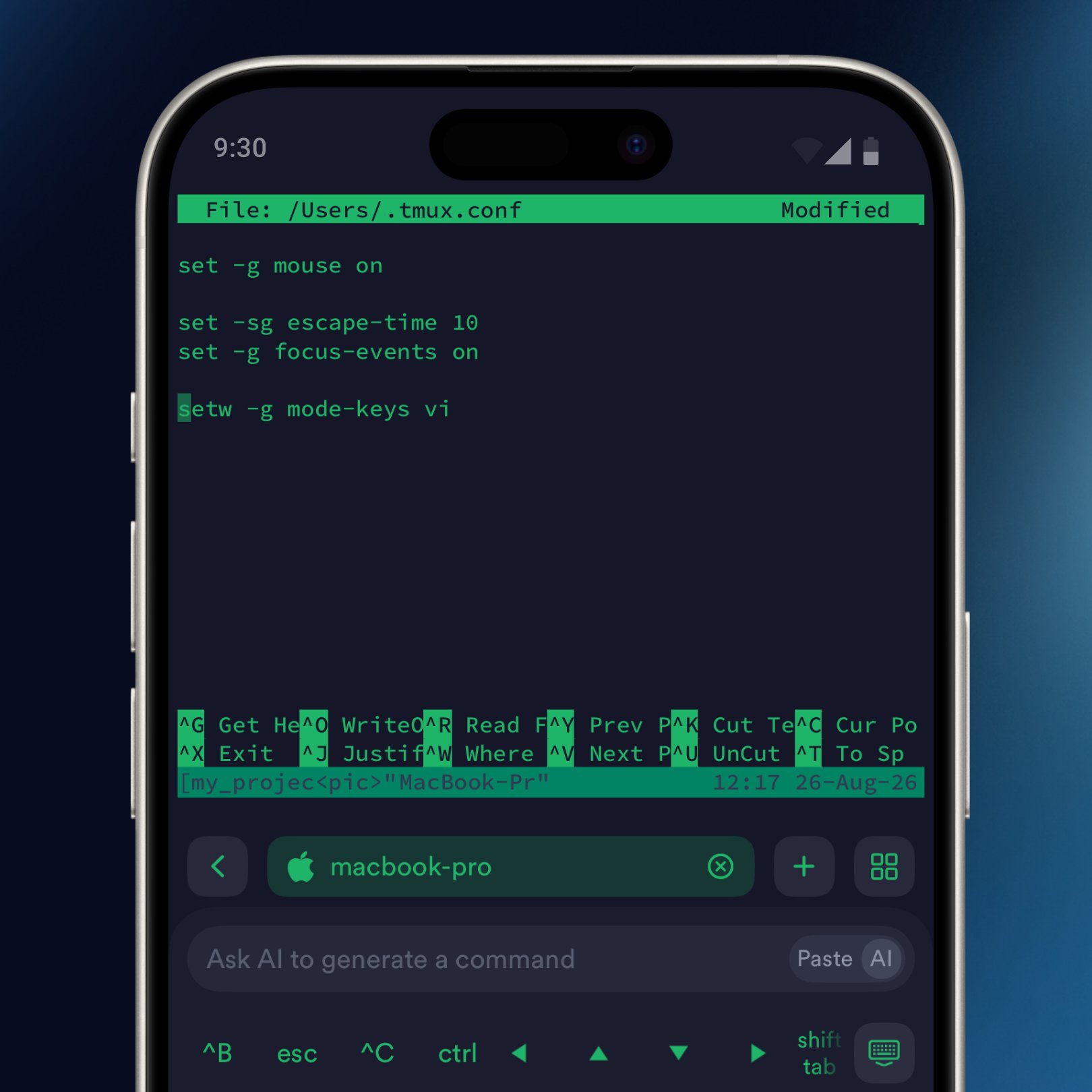
Four lines are enough for the server side of this guide. The startup snippet stays out of this file. If you already have a longer conf, merge these four and delete duplicates rather than appending a second copy of mouse or escape-time.
After saving, a new session picks the file up automatically. A session that was already running needs an explicit reload. Do not restart the SSH connection just to reload tmux options; that only tests the snippet, not the conf.
- set -g mouse on
- set -sg escape-time 10
- set -g focus-events on
- setw -g mode-keys vi
Reload, then test on the phone
Inside an existing tmux session run `tmux source-file ~/.tmux.conf`. The command should print nothing on success. Then stay on the phone: scroll, tap a pane, press Esc in Vim, enter copy mode with ^B then `[`. Only after those four checks should you disconnect and reconnect to confirm the Startup Snippet reattaches "my_project" instead of opening a second session called "my_project-1" or a bare bash.
If reconnect creates my_project-1, you typed `tmux new -s` without `-A`, or the snippet runs before tmux is on PATH. Use a login shell, or put the full path to tmux in the snippet. If reconnect does nothing, the snippet field is empty, or you edited a different host card than the one you tapped.
- tmux source-file ~/.tmux.conf
- Scroll, tap a pane, Esc in Vim, copy mode once.
- Disconnect and reconnect; you should land in the same named session.
Mistakes that look like “tmux is broken on mobile”
The most common one is putting the create-or-attach command in ~/.tmux.conf. The file is not a shell. The next common one is enabling mouse mode and then wondering why Termius scrollback no longer moves: that is expected; the pane now owns the swipe. Use copy mode when you need history that has already rolled past the pane.
The third is customizing keys on one device and expecting iCloud or a Termius team vault to copy them everywhere. Check Customize Keyboard on the phone you commute with. The fourth is leaving escape-time at 500 and blaming Neovim. The fifth is naming every session "tmux" so -A always attaches the wrong project.
- Startup command in tmux.conf instead of the host snippet.
- Forgetting to reload an already-running server.
- Expecting the phone clipboard and the tmux buffer to be the same thing.
- Generic session names that collide across projects.
Done when these are true
You are done when a cold connect from the phone lands in a named session, touch selects panes, Esc is instant, and you can copy a line without fighting the OS selection handles.
- Four lines in ~/.tmux.conf, one copy of each option.
- Startup Snippet is tmux new -A -s "your_name".
- Keyboard Group 1 starts with your prefix.
- Reload tested inside a live session.
- Reconnect reattaches; it does not spawn name-1.
- You can quote the original thread URL if someone asks where the five tips came from.